Accounting & professional firms
Clients, work, and billing under one roof.
Your ledger software is not the problem. What sits badly is everything around it: which client owes you what, which piece of advisory work is running, and whose hours have not been billed since March.
The objection, first
"Our work is the same twelve times a year. Does it know that?"
It does not, and for a firm whose year is a repeating calendar that is the thing to weigh before anything else on this page.
Corker has no recurring projects, no recurring tasks, no project templates and no checklists. There is no statutory deadline register, nothing that knows a VAT period from a year-end, and nothing that generates January's work from December's. A project has start and end dates and an issue has a single deadline; that is the whole of it. Firms that run a monthly cycle in Corker create the period's work themselves, and if you were hoping to press a button in January and get twelve months of scheduled obligations, that button does not exist.
The second half of the same objection: Corker is not an accounting package and does not talk to one. There is no ledger, no bookkeeping, no tax computation, no SIE file, no e-invoicing and no connection to Fortnox, Visma, Xero or QuickBooks. Cost centres and accounting codes are recorded on projects for your own grouping and are not even carried onto the invoice. Whatever you use to keep the books, you keep using it, and moving figures across is a manual step.
Which leaves a narrow, honest description of the fit: Corker suits a firm whose compliance calendar already lives in a dedicated system, and whose advisory, project and hourly work is currently spread across a spreadsheet, a shared inbox and an invoicing tool. That part it does well, and the rest of this page is about that part.
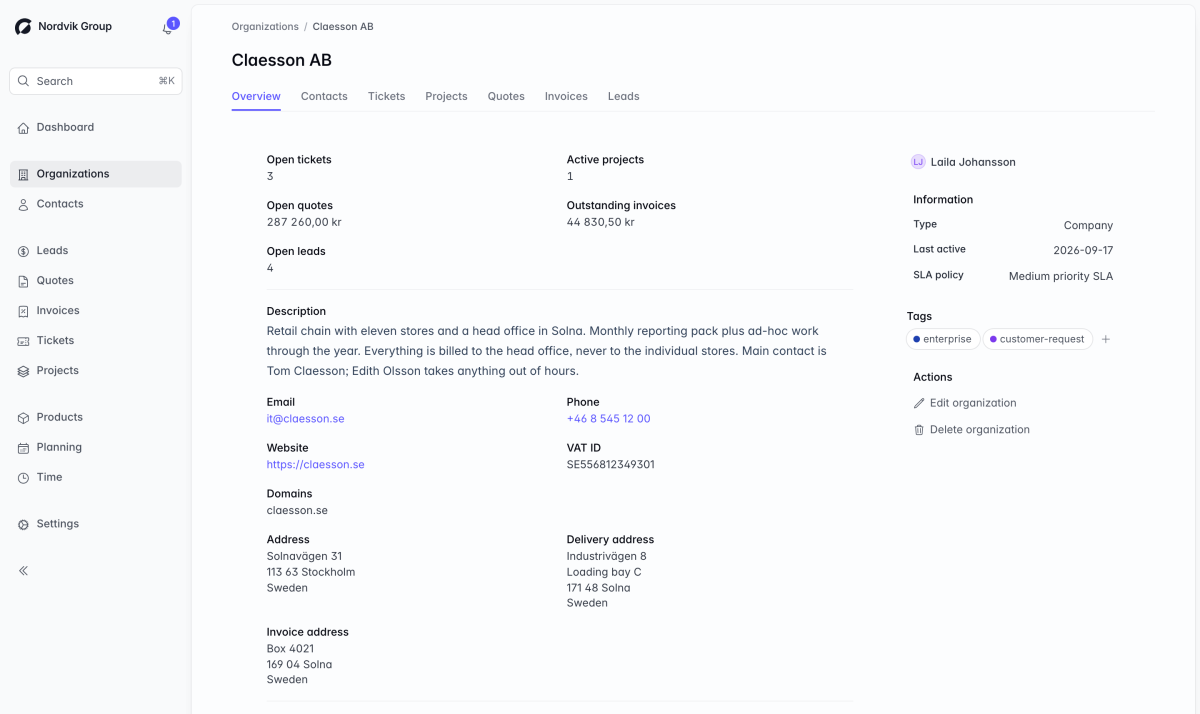
One record per client, and everything hangs off it.
A firm of twelve people typically holds a client in four places: the ledger, a spreadsheet of engagements, an invoicing tool and somebody's inbox. Corker holds them once.
The full client records page goes through all of it, including what a client record deliberately does not hold.
The identifiers a document needs
A registration number and a VAT number on every organisation, a general address, an invoice address and a delivery address, an owner in your team, and a type — company, partner, reseller, subcontractor, supplier, wholesale or private person. The invoice address is what a new quote or invoice fills itself in with.
Group structures
An organisation can sit under a parent, and a parent lists its direct children. Useful when one client is four companies and a holding entity. It does not total them: there is no roll-up of a group's invoices or work.
Contacts that file themselves
Give a client their email domains and a new contact arriving from one of those domains is attached to that company automatically, rather than landing in a general list somebody sorts later.
Every kind of work on one page
Contacts, tickets, projects, quotes, invoices and leads each get a tab on the client, and each tab appears only if your role allows it. The overview totals open tickets, active projects, open quote value and outstanding invoices — per currency, never added across currencies.
Roles that match a firm
Ninety-eight separate permissions and roles you define per workspace, so an assistant can record time and read client details without being able to issue an invoice or see the pipeline.
A trail on the things that get queried
Issues, projects, epics and leads record what changed, from what to what, and by whom. Organisations and contacts keep comments but not a per-field history — worth knowing before you rely on it for a client file.
The advisory half of the firm.
The work that is not a statutory return — a restructuring, a systems migration, a due diligence, a year of monthly advisory — behaves like a project, and that is the shape Corker is built around.
Scope it as a quote with priced lines per phase and free-text lines for the caveats, and send it as a branded PDF from inside Corker. Accepted, it converts into a draft invoice that copies every line exactly; or run it as a project, where issues carry an owner, a deadline, an estimate and a priority, gathered into epics if the piece is long enough to have phases. Hours are logged against the project and an activity — bookkeeping, payroll, advisory, each priced once for the workspace and marked invoiceable or not — and at month end Add unbilled hours pulls every uninvoiced billable hour for that client onto the draft invoice, grouped by activity.
The part that matters for a firm billing time: once the invoice leaves draft, the hours behind it lock. A timesheet that can be quietly rewritten after billing is a timesheet you cannot defend to a client who queries the March fee. How hours reach an invoice.
Running the recurring work anyway
Since there is no recurrence, firms that do run their cycle here do it in one of two ways. A long-running project per client, with an issue per obligation and a deadline on each, worked from a list filtered by assignee and due date. Or a project per period per client, created fresh each month, which keeps the reporting clean and costs someone twenty minutes at the start of every cycle.
Both work. Neither is automated, and no amount of page design should make that sound like a feature.
The invoice details that usually need a second system.
Tax is applied per line rather than per document, and the rate is copied onto the line as you add it, so a mixed-rate invoice is ordinary and editing a rate next year never rewrites a document you already issued. The PDF breaks the tax down per rate.
For Swedish work: an OCR reference with a valid check digit is generated for invoices in kronor, the bank details you have set — bankgiro, plusgiro or anything else you label yourself — print on the document, and cash rounding follows the workspace setting when the invoice is in the workspace currency. EU reverse-charge wording appears when the conditions for it are met: both parties holding VAT numbers in different EU countries, and every rate on the document at zero. At the moment you finalise a document the sender details are frozen onto it, so reprinting it in three years gives you the document you actually sent. The full quotes and invoicing page.
Check these first
What a firm should check before switching.
- No client document vault. Reusable documents — terms, standard letters — live in workspace settings and attach to quotes and invoices. Files cannot be attached to a client or a contact at all, and there is no client-facing document exchange.
- No e-signature and no client approval link anywhere in Corker.
- No per-client payment terms, currency or language. Those are workspace settings; the invoice address is the one thing a client record pre-fills onto a document.
- No automatic dunning. An issued invoice becomes overdue on its own and appears on the dashboard, and Send reminder is a button a person presses.
- No import of clients or contacts, and no export of them either. The only export in the product is the time-entry CSV.
- No duplicate detection and no merging of client records.
- The client portal and inbound email — a client submitting and following their own request, and a forwarded email becoming a ticket — arrive at launch. They are written and tested; they are not switched on in production.
Tell us what your year actually looks like.
Corker is in private beta and access is granted in small groups. Recurring work is the largest gap this page admits to, and the firms in the beta are the ones who will decide what it should look like when it is built.
Someone else's version of the same week.
Corker is one product, and these pages describe how differently it is used depending on what you sell. See all five segments on the homepage.
- Agencies & studios Pitch, deliver and bill a client campaign from the same record, with the week planned against the people you actually have.
- IT services & MSPs A ticket queue with SLA targets per client and business hours — and a clear account of what Corker is not, if you are looking for an RMM.
- Consultancies Proposal, engagement, hours and invoice in one line — and the truth about utilisation reporting, which Corker does not have.
- Contractors & small teams Quote today, invoice on Friday, and a short list of what a two-person team gives up by using one tool instead of five.
Ready to bring it all into one place?
Corker is in private beta. Join the waitlist and we will be in touch when your invite is ready.
© 2026 Corker. In private beta.