Support & SLAs
Answer clients fast — and prove it.
A support request that arrives without its history is a request somebody has to research before they can answer it. Corker's tickets sit on the same client record as the project, the quote and the invoice.
What is live today, and what arrives at launch.
This page is split deliberately, because support is the one part of Corker where a piece of the story is still behind the launch line, and burying that would be the kind of thing this whole site exists not to do.
Live today: the shared queue, SLA policies per client with business hours, automatic breach detection, internal notes, canned responses, the ticket timeline and the link from a ticket to the issue that resolves it. Tickets are raised inside the app, and replies are emailed to the client.
Two pieces arrive when Corker launches: email in, ticket out — forward or CC an address and Corker files a routed, threaded ticket by itself — and a public portal where clients submit and follow their own requests. Both are built and tested. Neither is switched on in production, and neither will be described here as available until it is.
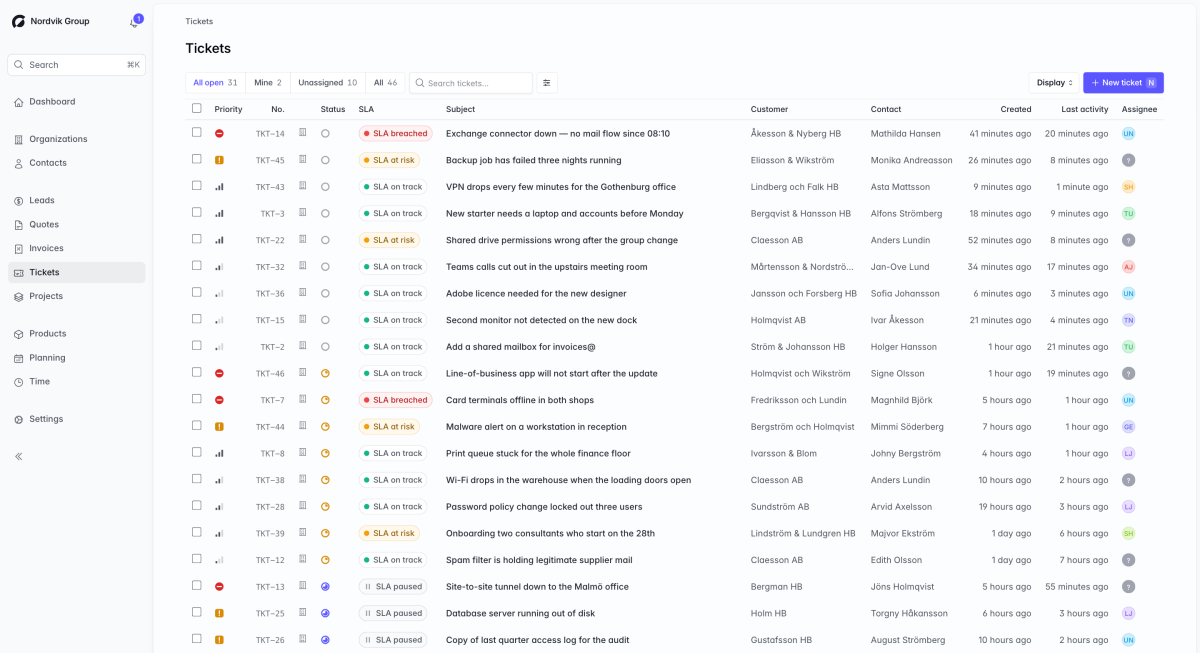
The queue you have today.
Everything in this list is in the product now, reachable in production, and covered by tests.
One queue, four ways to look at it
All open, mine, unassigned and everything, as a list or a kanban board, grouped by status, priority or assignee. Filter by status, priority, assignee, client, or SLA state — at risk or breached — and search the subject and the ticket number. The view you left is the view you come back to.
Assignment, one at a time or in bulk
Assign from the ticket, or drag it onto a colleague's column on the kanban board. Select several and assign or unassign them together, or close them together — closing in bulk asks first and tells you how many conversations it will end.
SLA policies with real business hours
A policy sets a first-response target and a resolution target in minutes for one priority, optionally inside a weekly business-hours window — the weekdays you work and the hours you work them. Outside those hours the clock does not run, and the window is rebuilt per local day so daylight saving does not quietly eat an hour of your budget.
A policy per client, falling back to the workspace
Assign a policy to an organisation and tickets from that client at that priority are measured against it; everything else falls back to the workspace policy for its priority. A ticket with no matching policy simply has no SLA rather than an invented one.
The clock pauses when the ball is in their court
The SLA clock runs while a ticket is new or open and pauses while it is pending or on hold, banking the working time already used. Waiting on the client does not count against you, and resuming does not reset anything.
Breaches found by the system, not by the client
A job checks every open ticket every five minutes, records first-response and resolution breaches once each, and notifies the assignee — or every team leader if nobody owns it. A ticket is flagged at risk once less than a fifth of its budget remains, so the warning arrives while it is still actionable.
Internal notes and public replies, clearly separated
An internal note is for the team and never leaves the workspace. A public reply is emailed to the requester and everyone CC'd on the ticket, stamps the first-response time if it is the first, and moves a new ticket to open. Canned responses are inserted into the draft reply rather than sent blind.
Linked to the work that fixes it
A ticket links to any number of issues in your projects, so the bug report and the piece of work that resolves it are joined up. The ticket sits on the client's record next to their projects, quotes and invoices.
At launch
Two pieces that arrive when Corker launches.
These are the two features most people ask about first, and they are the two that are written but not yet switched on. They are described here in the future tense on purpose.
Email in, ticket out
Forward or CC a support address and Corker files the message as a ticket, routed to the right workspace by the address it arrived at. Replies thread back onto the original ticket by the message identifier the outgoing mail carried, falling back to the ticket reference in the subject line. Auto-replies and out-of-office bounces are recognised and ignored, duplicate deliveries are filed once, and quoted history is stripped off the bottom of a reply before it lands in the thread. The code is written and tested; the address is not switched on in production yet.
A portal where clients submit and follow their own requests
A public form per workspace — protected against bots by a honeypot, a minimum fill time and per-address rate limits — plus a page where a client can read the whole thread and reply to it. Access is by expiring signed link rather than a password, each recipient getting their own, and a contact can be allowed to see only their own tickets or everything their organisation has raised. The pages carry your name, your logo and your brand colour, in your workspace's language. Also written, also tested, also not switched on in production yet.
The honest part
What support does not do.
Corker's support is built for a small team answering their own clients, not for a contact centre. These are the things a dedicated helpdesk has that Corker does not.
- No public API for creating tickets. Today a ticket is raised inside the app; at launch, by email or through the portal.
- No attachments on tickets, in either direction. Files travel on issues and on comments elsewhere in Corker, not on a support conversation.
- No reporting on ticket volume, average response time or SLA attainment. First-response and resolution times are recorded on every ticket and breaches are stored, but nothing averages or charts them yet.
- Canned responses are fixed text. There are no merge fields, so no automatic "Hi :first_name".
- No merging two tickets, no escalation ladder, no round-robin or rule-based assignment, and no satisfaction survey.
- No tags on tickets and no agent-side watching or subscribing. The CC list is for the client's people, not yours.
- SLA breach alerts are in-app notifications, not emails or chat messages.
- A ticket has no category or type field. It has a priority, a client, a contact and optionally a project.
- Public holidays are not excluded from SLA business hours. The weekly window is the whole of the calendar Corker keeps for SLAs.
One more distinction, because the words collide: Corker has SLA features for your tickets. Corker itself offers no uptime service level agreement. More about how Corker is built.
Be there when the inbox opens.
Corker is in private beta and access is granted in small groups. The email and portal pieces switch on at launch; joining the waitlist now is how you get to shape what they do first.
The rest of the system.
Corker is one product rather than six, and each page below describes a different part of the same set of client records. See how the whole lifecycle fits together on the homepage.
- Pipeline & CRM Lead boards with the stages you choose, weighted pipeline value, and a won lead that becomes a project.
- Projects & delivery Issues, epics, boards and lists for fixed-price, time-and-material, retainer and internal work.
- Time tracking Hours logged against a project and an activity, billable or not, ready to pull onto an invoice.
- Quotes & invoicing Quotes and invoices as branded PDFs, built from the work you already tracked.
- Client records Organisations and contacts that every lead, project, hour, quote and invoice points back at.
Ready to bring it all into one place?
Corker is in private beta. Join the waitlist and we will be in touch when your invite is ready.
© 2026 Corker. In private beta.