Client records
Every client, contact, and conversation in one record.
This is the least glamorous page on the site and the reason the rest of Corker works. One record per client, and everything else points at it.
The record everything else hangs off.
In a stack of five tools, a client exists five times. The CRM has their name spelled one way, the invoicing app has last year's billing address, the helpdesk has a contact who left in March, and nobody can say with confidence what that client is currently worth to the business without opening four tabs and doing arithmetic.
Corker has one organisation record, and every lead, project, ticket, quote, invoice and logged hour points at it. Change the invoice address once and the next invoice is right. Look at the client and the open tickets, the active projects, the open quote value, the outstanding invoices and the open leads are on the same page, each behind its own permission.
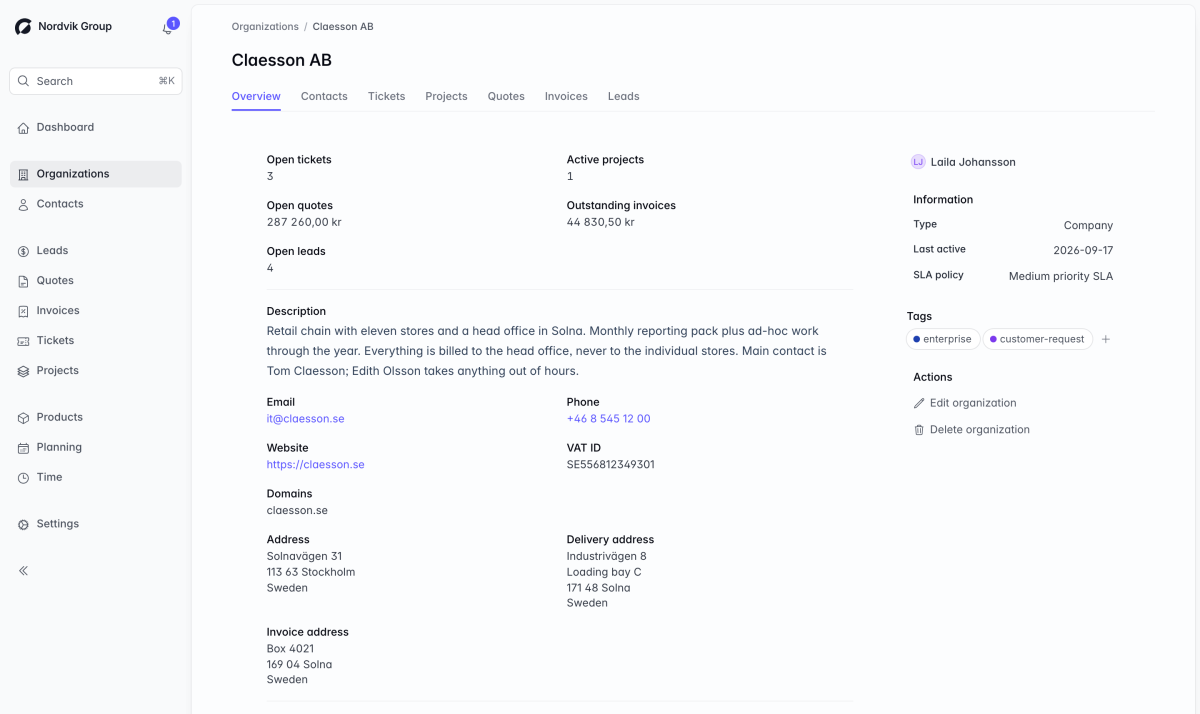
What a client record holds.
All of it is in the product today, and the fields are the ones a quote, an invoice and a support ticket actually need rather than a generic contact database.
An organisation, with the details a document needs
A name, a reference number, a type — company, partner, reseller, subcontractor, supplier, wholesale or private person — a description, an email, a phone number, a website, a registration number and a VAT number, plus the person in your team who owns the relationship.
Three addresses, because one is never enough
A general address, an invoice address and a delivery address, each with street, second street line, postal code, city and country. The invoice address is what a new quote or invoice fills itself in with, falling back to the general one.
Parent and child companies
An organisation can sit under another, and a parent lists its direct children on its own page. Reassigning a parent is checked so a company cannot end up as its own ancestor.
Contacts, and a new one that files itself
Contacts carry a name, an email, a phone number and free notes, and belong to one organisation or to none. Give an organisation its email domains and a new contact arriving from one of them is attached to that company automatically — which is what makes support email work without anyone sorting it by hand.
Every tab the client's work needs
Contacts, tickets, projects, quotes, invoices and leads each get their own tab on the organisation, with search where the list can get long. Each tab appears only if your role lets you see that kind of record.
The headline numbers on the overview
Open tickets, active projects, the value of open quotes, the amount outstanding on invoices, and open leads. Money is totalled per currency and never added across them, so a client you bill in two currencies reads correctly rather than plausibly.
An SLA policy attached to the client
Assign a support SLA policy to the organisation and tickets from that client are measured against it rather than the workspace default. Assigning it is a permission of its own.
Deletion that refuses to orphan anything
An organisation with a project, a quote or an invoice against it cannot be deleted, and neither can a contact who is the requester on a ticket. Eleven separate permissions cover viewing, creating, editing, deleting, assigning contacts to companies, managing portal access and assigning SLA policies.
What one record actually saves you.
The address is typed once
Starting a quote or an invoice for a client copies their invoice address onto the document, falling back to their general address, and the chosen contact's name becomes the recipient. The address is then frozen onto the document when you finalise it, so a client who moves next year does not retroactively change what you sent them last year.
The client's people are already known
Contacts are the same records the support side uses: the requester on a ticket, the people CC'd on it, and the recipient on a quote. Give an organisation its email domains and new contacts from those domains file themselves under the right company, which is what will let an emailed support request find its client on its own when inbound email goes live at launch.
Each contact also carries how much of the client portal they should see — only their own tickets, or everything their organisation has raised. The setting is stored and editable today; the portal it governs arrives when Corker launches, so nothing is exposed by it in the meantime.
The client's service level lives with the client
A retainer client on a faster response target does not need a rule somewhere in a support tool. The SLA policy is attached to their organisation, and their tickets are measured against it automatically.
The honest part
What client records do not do.
Corker's client record is a spine for the work, not a data-management product. Here is where it stops.
- No roll-up to a parent company. A parent lists its children; it does not total their tickets, projects or invoices.
- No VAT validation and no company lookup. The VAT and registration numbers are fields you fill in — nothing checks them against a registry, and there is no data-enrichment service behind them.
- No job title or role on a contact, and no designated primary contact for a company.
- A contact belongs to one organisation. The same person cannot be filed under two companies in the same workspace, and each email address is unique within it.
- No change history on clients. Organisations and contacts have comments, but not the per-field audit trail that leads, issues, epics and projects keep.
- No custom fields, and no files attached directly to a client or a contact.
- No duplicate detection and no merging. Nothing stops two records for the same company being created, and nothing will join them afterwards.
- No import and no export of clients or contacts. The only export in Corker is the time-entry CSV.
- No currency, language or payment terms held per client — those are workspace settings today. The invoice address is the one thing a client record pre-fills onto a document.
- No way to restrict a colleague to a subset of clients. Anyone who can view clients can view all of them in that workspace.
The absence of an importer is the one that will cost you on day one, and it is worth saying so before you join rather than after.
Bring your client list.
Corker is in private beta and access is granted in small groups. Tell us how many clients and contacts you would be moving over when you join the waitlist — that number is what decides how soon an importer is worth building.
The rest of the system.
Corker is one product rather than six, and each page below describes a different part of the same set of client records. See how the whole lifecycle fits together on the homepage.
- Pipeline & CRM Lead boards with the stages you choose, weighted pipeline value, and a won lead that becomes a project.
- Projects & delivery Issues, epics, boards and lists for fixed-price, time-and-material, retainer and internal work.
- Time tracking Hours logged against a project and an activity, billable or not, ready to pull onto an invoice.
- Quotes & invoicing Quotes and invoices as branded PDFs, built from the work you already tracked.
- Support & SLAs Tickets on the same client records, with SLA targets per organisation and automatic breach checks.
Ready to bring it all into one place?
Corker is in private beta. Join the waitlist and we will be in touch when your invite is ready.
© 2026 Corker. In private beta.