Time tracking
Capture every billable hour — and turn it into revenue.
Hours that never reach an invoice are the most expensive thing a small client business owns. Corker's timesheet exists to close that gap, not to win a stopwatch competition.
The hours are not the problem. The distance to the invoice is.
Most teams already record their time somewhere. The leak is not in the recording — it is in the fortnight-long journey from a spreadsheet, through a filter, into a copy-paste, onto an invoice that somebody has to reconcile by hand and nobody wants to.
Corker shortens that journey to one screen. Hours are logged against a project you already have, for an activity your workspace already priced, and when it is time to bill that client the uninvoiced billable hours are sitting inside the draft invoice waiting to be selected.
The trade-off is worth stating up front: this is a deliberate, typed timesheet rather than a stopwatch. If your team lives on a start-stop timer, Corker will feel slower. If your team reconstructs the week on Friday afternoon, it will feel considerably faster — and the reconstruction will end up on an invoice instead of in a spreadsheet.
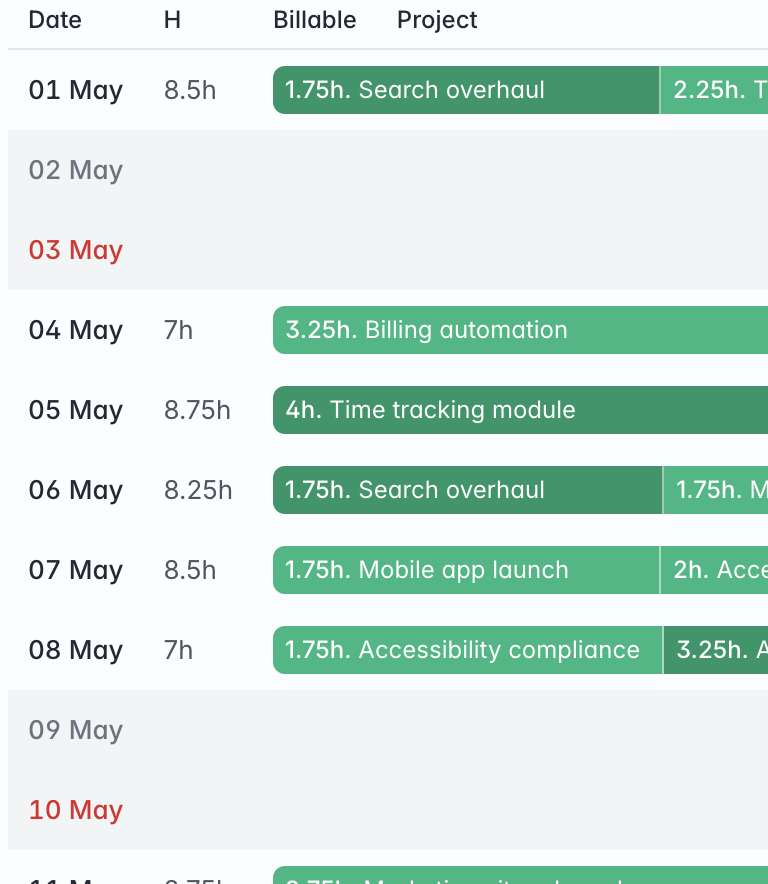
What the timesheet gives you.
Every line below describes something the software does today. The list of things it does not do is further down the page, and it is not short.
Month, week and day
One page, three periods, and arrows to step backwards and forwards through them. Each period is a list of its days, with the entries logged on each and the hours they add up to, so a gap in the week is visible rather than inferred.
An entry is a date, a span and what it was for
A date, a start time and an end time — type any two of the three and the hours fill themselves in — plus the project, the activity, a description and an internal comment that stays inside the workspace. The client organisation is taken from the project rather than asked for again.
Billable is a property of the activity, not a checkbox
Activities are defined once for the workspace: which ones can be logged against, which ones are invoiceable, and what each one costs per unit. An hour of a billable activity is billable at that price; an hour of an internal one is not. Nobody has to remember to tick anything, and nobody can quietly untick it.
Totals that split the way you need them to
The period shows total, billable and non-billable hours. Every day shows its own total with a proportional billable bar, and in month view each week shows its total with the billable share in brackets.
Unbilled hours, straight onto a draft invoice
From a draft invoice, Add unbilled hours lists every uninvoiced billable entry for that client, grouped by activity, with a running total of what you have selected. Confirm and each entry becomes an invoice line — hours as the quantity, the activity's price as the unit price, the activity's tax rate applied.
Invoiced time stops moving
An entry that has been put on an invoice is stamped with the invoice line it became and shows a link to it. Once that invoice leaves draft the entry locks: it cannot be edited or deleted, which is the only way the invoice and the timesheet can still agree next quarter. Remove the line from a draft and the entry unlocks.
A CSV export that matches what is on screen
Thirteen columns — date, start, end, hours, billable, user, organisation, project, activity, description, internal comment, invoiced and invoice — carrying exactly the filters the page is showing, so the file matches the figures you were just looking at.
From a logged hour to a paid one.
Billing it
Create a draft invoice for the client and choose Add unbilled hours. Corker lists every billable entry for that organisation that has never been invoiced, from anyone on the team, grouped by activity. Select a group, select all of them, or pick line by line; the total updates as you go.
Confirm, and each selected entry becomes its own invoice line at the activity's price with the activity's tax rate, and the entry is marked as invoiced against that line. Nothing is summarised into a single opaque "consulting" row unless that is how you priced the activity.
Keeping it straight afterwards
Once the invoice is issued the entries behind it are locked, with a padlock and the reason shown in the timesheet. That is deliberate: a timesheet you can quietly rewrite after invoicing is a timesheet you cannot defend. If the invoice is still a draft, removing the line releases the hours again.
For anything the page does not total, there is the CSV — same rows, same filters, thirteen columns including whether each hour was invoiced and on which invoice.
The honest part
What time tracking does not do.
This is the feature where the gap between what people expect and what Corker does is widest, so it gets the longest list on the site.
- No running timer. There is no start-stop stopwatch anywhere in Corker: every entry is typed in with a start and an end, and an entry with no end cannot be saved.
- No mobile app, no browser extension and no integration with an external timer.
- Time is logged against a project and an activity. There is no "log time" button on an issue or a ticket, and there is no epic to log against.
- No hourly rate per person, per client or per project. A price lives on the activity, and that is the only rate there is.
- No approval or submission workflow. Nothing is submitted, nothing is approved, and a period cannot be locked by hand — invoicing is what freezes an entry.
- No utilisation reporting, and no totals grouped by project, client or person. The page totals a period, a week and a day; anything else is the CSV and a spreadsheet.
- The working week and holidays you set for planning do not constrain time tracking. Nothing warns you for logging eleven hours, or for logging on a public holiday.
- The unbilled-hours picker shows every colleague's uninvoiced billable entries for that client to anyone who can add hours to an invoice, including their descriptions.
Tell us how your team records time.
Corker is in private beta and access is granted in small groups. If a timer is non-negotiable for you, say so when you join the waitlist — that is exactly the kind of thing the beta is there to settle.
The rest of the system.
Corker is one product rather than six, and each page below describes a different part of the same set of client records. See how the whole lifecycle fits together on the homepage.
- Pipeline & CRM Lead boards with the stages you choose, weighted pipeline value, and a won lead that becomes a project.
- Projects & delivery Issues, epics, boards and lists for fixed-price, time-and-material, retainer and internal work.
- Quotes & invoicing Quotes and invoices as branded PDFs, built from the work you already tracked.
- Support & SLAs Tickets on the same client records, with SLA targets per organisation and automatic breach checks.
- Client records Organisations and contacts that every lead, project, hour, quote and invoice points back at.
Ready to bring it all into one place?
Corker is in private beta. Join the waitlist and we will be in touch when your invite is ready.
© 2026 Corker. In private beta.