Quotes & invoicing
From quote to paid, without leaving the platform.
The document that goes to the client is the one part of this job with no room for approximations. Corker builds it from the work you already recorded, and freezes it the moment you issue it.
Billing is where the seams show.
A quote is written in a documents app, the work happens in a project tool, the hours pile up in a spreadsheet and the invoice is typed a third time into an accounting package. Each retyping is a chance to bill the wrong number, and the reconciliation at the end of the month is somebody's entire Friday.
In Corker the quote, the project it becomes, the hours logged against it and the invoice that closes it are the same chain of records. An accepted quote converts into a draft invoice line for line. Uninvoiced billable hours drop onto the invoice as priced lines. The client's invoice address is already there because it is on their record.
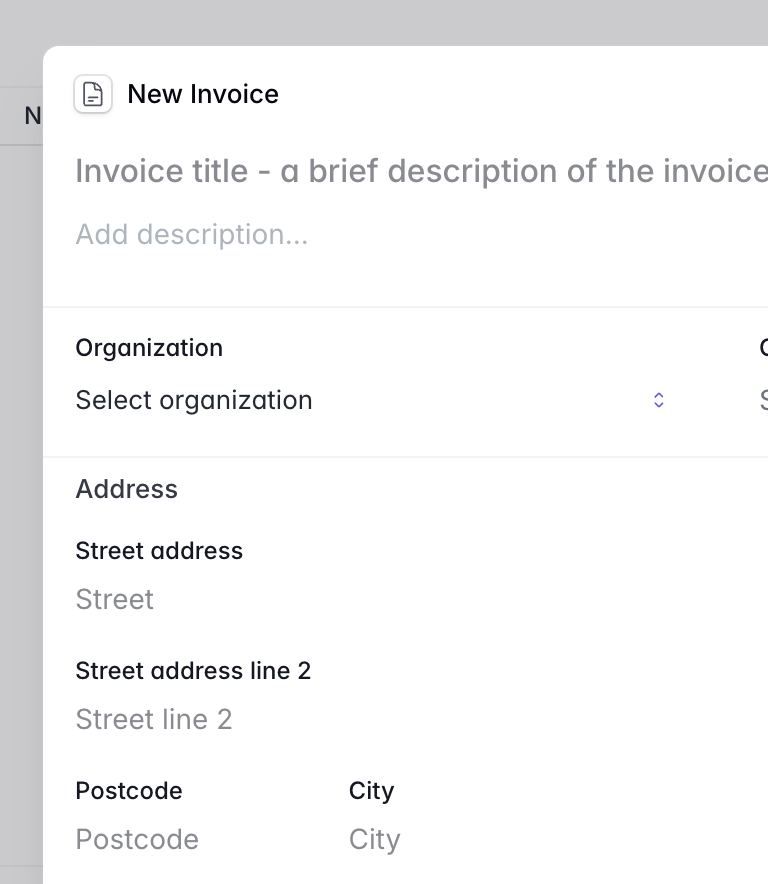
What quoting and invoicing gives you.
This is the most finished part of Corker, and the list is correspondingly long. What it still does not do is set out further down.
Lines that behave like a real document
A quote or invoice is built from lines of three kinds: priced lines, free text lines for the paragraph that explains the section beneath it, and discount lines. Lines nest, so a discount can belong to one line or to the whole document, and you drag them into the order the client should read them in.
Tax per line, defined once for the workspace
Tax rates are set up in workspace settings and applied per line rather than per document, so a mixed-rate invoice is normal rather than a workaround. The rate is copied onto the line when you add it, so editing a rate later never silently rewrites an issued document, and the PDF shows the tax broken down per rate.
Branded PDFs, and the sender frozen into them
Quotes and invoices render as PDFs carrying your logo, company name, address, registration number, VAT number and bank details. Drafts render inline with a watermark and no number. At the moment you finalise a document, the sender details and the attachments are frozen onto it, so reprinting it in two years gives you the document you actually sent.
Sent from Corker, with the delivery tracked
Send a quote or an invoice by email from inside the app; the PDF and any attached documents go with it. Delivery, opens, clicks and bounces come back and land on the invoice's own timeline, so "we never got it" is a question with an answer.
Revisions, duplicates, accepted and declined
A quote revises into a new draft that keeps the link to the one it replaces and bumps its revision number, and the old one is marked revised. Any quote or invoice duplicates into a fresh draft. Quotes are marked accepted or declined in the app, and expire on their own after the validity period the workspace sets.
Accepted quote to invoice, and hours to invoice
An accepted quote converts into a draft invoice that copies every line exactly — structure, discounts, tax rates and all. Separately, Add unbilled hours pulls a client's uninvoiced billable time onto the invoice as priced lines. Corker allows one live invoice per quote, so converting twice is refused until the first is voided or credited.
Credit notes, voids and payments you record
A credit note mirrors an invoice with the amounts negated and marks the original credited once it is fully covered. An invoice can be voided, or marked uncollectible. Payments are recorded against the invoice with a date, a method and a reference; part payments are supported and the outstanding amount follows them, marking the invoice paid when it reaches zero.
The Swedish details, because they are fiddly
Bankgiro and plusgiro numbers print on the invoice, a check-digit OCR reference is generated for invoices in Swedish kronor, EU reverse-charge wording appears when it applies, and cash rounding follows the workspace setting when the document is in the workspace currency.
The route a document takes.
Finalised
Finalising is the one-way step. The document takes its number from the workspace's numbering rules, under a lock so two people finalising at the same moment cannot collide. Your company details are snapshotted onto it and the attachments are frozen, markdown documents rendered to PDF as they go. From here the document is a record rather than a draft.
Sent, accepted, converted
Send it by email from Corker and the PDF goes as an attachment. Quotes carry a validity period and expire when it passes. When the client says yes, mark the quote accepted and convert it: you get a draft invoice with every line, every discount and every tax rate carried across untouched, and the quote and invoice stay linked to each other.
Paid, credited, or written off
An issued invoice becomes overdue on its own once the due date passes, and the overdue list with the outstanding amount per currency is on the dashboard. Record payments as they arrive, in parts if that is how they arrive; the outstanding figure follows and the invoice marks itself paid when it reaches zero. Where a correction is needed, a credit note mirrors the invoice with negative amounts and marks the original credited. An invoice with no payments against it can be voided outright.
The honest part
What quoting and invoicing does not do.
Corker issues documents and tracks what happened to them. It is not an accounting system and it is not a payment provider, and the boundary is worth being precise about.
- Corker does not take payments. There is no card processing, no payment link and no direct debit — a payment is a record you enter after the money arrives.
- No recurring invoices and no subscription billing. A retainer is invoiced by duplicating last month's invoice.
- No automatic dunning. There is a Send reminder action on an overdue invoice, and a person has to press it.
- No accounting integration and no ledger export — no Fortnox, Xero or QuickBooks connection, no SIE file and no e-invoicing. Cost centres and accounting codes are recorded on projects for your own grouping and are not carried onto invoices.
- No client-facing accept button. A quote is marked accepted or declined by someone in your workspace after the client replies, not by the client through a link.
- No revenue reporting. The dashboard shows overdue invoices and the outstanding amount per currency, and expiring quotes; there is no revenue, margin or period comparison anywhere.
- Currency is a label, not a conversion. There is no exchange rate and no reporting currency, which is why nothing is ever summed across currencies.
- Your logo goes on the PDF; your brand colour does not. PDFs use a fixed typographic style.
- Standard terms are attached as a document to each quote or invoice. There is no rich terms field on the document, and no setting yet that attaches your defaults automatically.
Put one of your own invoices through it.
Corker is in private beta and access is granted in small groups. Tell us which accounting package you use when you join the waitlist — where the export goes next is being decided out of those answers.
The rest of the system.
Corker is one product rather than six, and each page below describes a different part of the same set of client records. See how the whole lifecycle fits together on the homepage.
- Pipeline & CRM Lead boards with the stages you choose, weighted pipeline value, and a won lead that becomes a project.
- Projects & delivery Issues, epics, boards and lists for fixed-price, time-and-material, retainer and internal work.
- Time tracking Hours logged against a project and an activity, billable or not, ready to pull onto an invoice.
- Support & SLAs Tickets on the same client records, with SLA targets per organisation and automatic breach checks.
- Client records Organisations and contacts that every lead, project, hour, quote and invoice points back at.
Ready to bring it all into one place?
Corker is in private beta. Join the waitlist and we will be in touch when your invite is ready.
© 2026 Corker. In private beta.