Projects & delivery
Keep delivery organised, whatever the contract.
Delivery goes wrong in the gaps: work nobody owns, a week nobody has capacity for, and a decision nobody can find again. Corker closes all three in the same place the client lives.
The work, and the week it has to fit into.
Every project tool tracks tasks. Far fewer answer the question a small client-services business actually has on a Monday morning: given everything we have promised, can the four people we have got do it this week?
Corker splits that into two surfaces that share the same data. Projects hold the work — issues, epics, owners, priorities, estimates and deadlines, on a board or a list. The planning board holds the people, one row each, with the hours they are planned for set against the hours they actually have, after their working week and your public holidays are taken off.
What delivery gives you.
All of it is in the product today. Where a feature stops short of what the name suggests, that is written down here rather than left for you to discover in week two.
Four contract types, recorded on the project
A project is marked fixed price, time and material, retainer or internal, alongside its client, its category, its cost centre and its accounting code. Be clear about what that does: it labels and groups the project for your own reporting and bookkeeping. It does not switch Corker into a different billing mode.
Issues with the fields you actually fill in
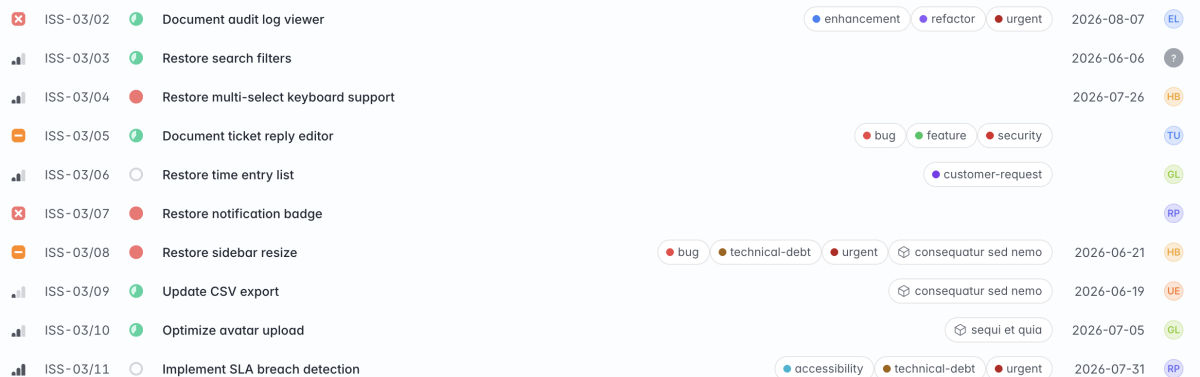
A reference number, a subject, a description, a status, a priority, an assignee, a deadline, an estimate in hours, tags and a parent issue for breaking work down. Statuses are Backlog, To do, In progress, In review, Completed and Rejected; priorities are Blocker, Urgent, High, Medium and Low.
Epics that group the work and show how far it has got
An epic gathers issues inside one project, with its own number, status — draft, in progress, completed or cancelled — its own start and end dates, its own lead, and a completion percentage taken from the issues it holds. The project page lists each epic with its closed-to-total count.
A board and a list for every project, and the board does more than status
Each project has both views, always. The board groups by status, by priority or by assignee, and dragging a card between columns changes whichever of the three you are grouped by — so reprioritising a week's work is a handful of drags rather than a handful of forms.
A manager and participants
Every project has one manager and a list of participants drawn from your workspace. They drive who the project is shown to and who gets notified about it; what someone is allowed to do is decided by their workspace role, not by being on the project.
Capacity planning that knows your working week
The planning board is one row per person, one lane per project, and bars across a window of one to twelve weeks. Drag to move a bar, drag its edge to resize it, drag across an empty row to create one, and undo if you were wrong. Each person's week shows planned hours against available hours, marked on track, tight or over.
A change history on the fields that get argued about
Issues record status, priority, assignee, parent, epic, deadline, subject, description, estimate and tag changes, one entry per change, with the old value, the new value and the person. Projects record status, manager, name, description and dates. Epics record status, lead, subject, description and dates. Threaded comments with @mentions and reactions sit in the same timeline, and issues take file attachments.
How a project runs.
Starting it
A project starts in planning, active or on hold, and moves to completed or archived as it finishes. It carries the client organisation, a manager, participants, a category, a contract type, a cost centre, an accounting code and a start and end date. A project that came out of a won lead arrives with the name, brief, category, contract type and tags already filled in.
Breaking it down
Issues are the unit of work. Each gets a reference of its own, an owner, a priority, a deadline and an estimate in hours in quarter-hour steps. Sub-issues break a big one apart. Epics gather issues into phases or workstreams with dates and a lead of their own, and show a completion percentage as their issues close.
Discussion stays on the issue. Comments thread, @mentions notify the person you named, reactions save a round of "agreed", and files attach where the work is rather than in a chat channel that will be scrolled past by Thursday.
Fitting it into the week
The planning board is the answer to the Monday question. Each person is a row, each project a lane, and each bar a block of planned minutes across a date span; you can attach a bar to specific issues. Drag to move, pull the edge to resize, drag across an empty row to plan new work, and undo the last change if you misjudged it.
Above each person's week sits the number that matters: planned hours against available hours, with absence already deducted, flagged on track, tight or over. Availability comes from the working week you set for the workspace, the per-person overrides, and the public holidays you entered once.
The honest part
What delivery does not do.
Corker is a delivery tool for small client teams, not a programme-management suite. These are the things it deliberately does not have.
- No Gantt chart, no dependencies between issues and no critical path. The planning board is a per-person week grid, not a project schedule.
- No milestones. Projects and epics have start and end dates; issues have a single deadline.
- No project budget, and no comparison of estimated hours against logged hours at the project level. Estimates are recorded, not enforced.
- No project-level progress bar. Completion percentage is calculated for epics only, and a parent issue does not roll up its sub-issues.
- Statuses and priorities are fixed lists shared across the workspace. There is no per-project workflow editor.
- No project templates and no recurring projects or tasks, and no rules engine — notifications and status side effects are built in rather than configurable.
- No profitability, margin or utilisation reporting. Hours and billable hours are totalled on the time page; nothing multiplies them by a cost.
- Attachments live on issues and on comments. A project or an epic takes files only through a comment.
Run a real project through it.
Corker is in private beta and access is granted in small groups. Join the waitlist and tell us how your delivery works today — the planning board in particular is shaped by how real teams size a week.
The rest of the system.
Corker is one product rather than six, and each page below describes a different part of the same set of client records. See how the whole lifecycle fits together on the homepage.
- Pipeline & CRM Lead boards with the stages you choose, weighted pipeline value, and a won lead that becomes a project.
- Time tracking Hours logged against a project and an activity, billable or not, ready to pull onto an invoice.
- Quotes & invoicing Quotes and invoices as branded PDFs, built from the work you already tracked.
- Support & SLAs Tickets on the same client records, with SLA targets per organisation and automatic breach checks.
- Client records Organisations and contacts that every lead, project, hour, quote and invoice points back at.
Ready to bring it all into one place?
Corker is in private beta. Join the waitlist and we will be in touch when your invite is ready.
© 2026 Corker. In private beta.