Pipeline & CRM
See every opportunity, and move it forward with confidence.
Enquiries arrive faster than anyone updates a spreadsheet. Corker gives them a board, a value, an owner and a next step — and a one-way door into delivery when you win.
Where an enquiry actually lives.
Most enquiries arrive as an email and then live in somebody's head. A spreadsheet appears, then a second spreadsheet, then a CRM that nobody updates because updating it is the fourteenth thing on the list. What the deal is worth, who spoke to them last and whether anyone is going to follow up are all written down somewhere, and none of them are available when you need them.
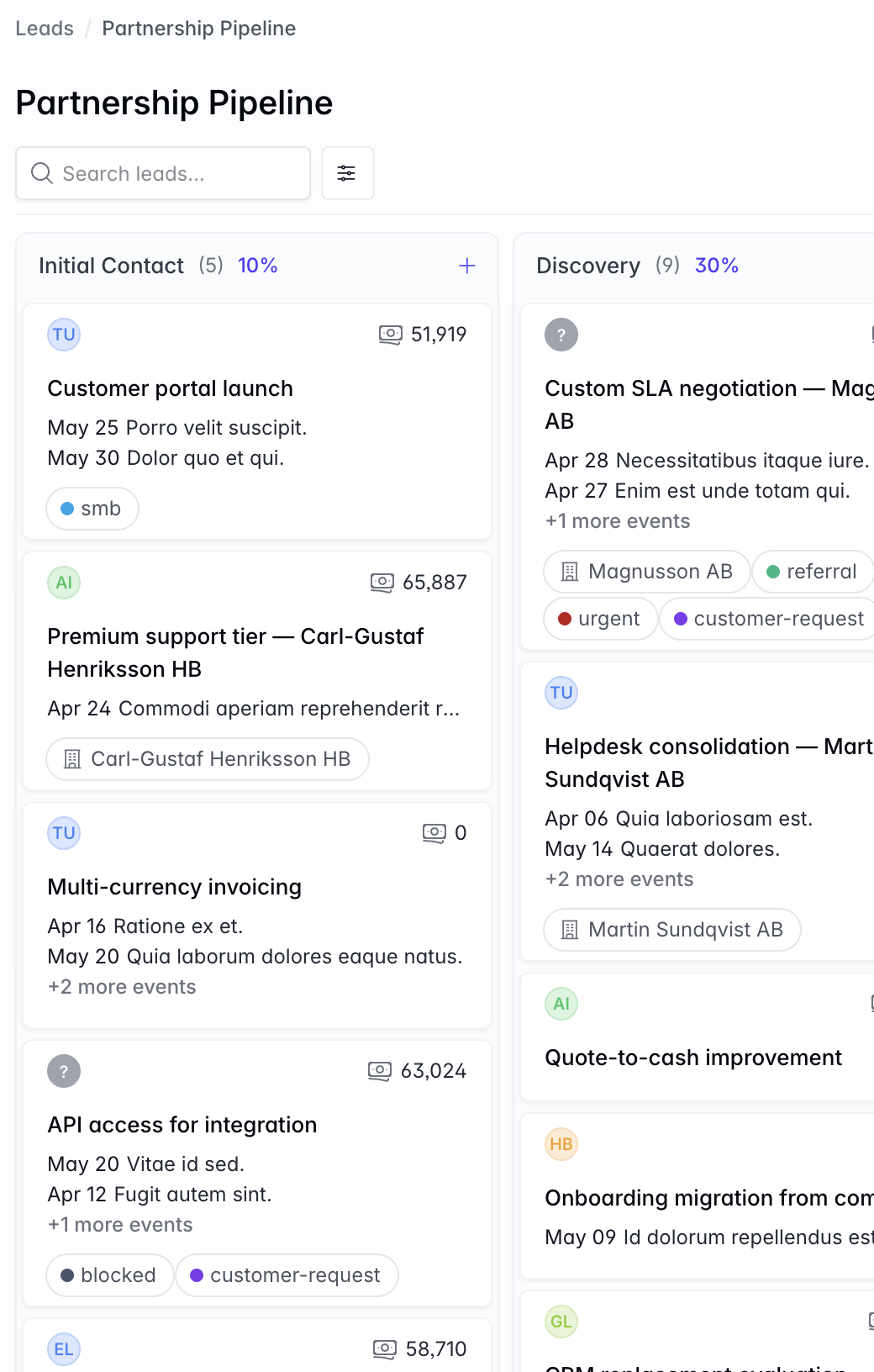
Corker's pipeline is a Kanban board per sales process, with the stages you actually use rather than the ones a vendor thinks you should. A lead is a card. Dragging it is the update, and the drag is what writes the history.
What the pipeline gives you.
Everything below is in the product today. Where a feature has an edge worth knowing about before you rely on it, the edge is written down rather than left for you to find.
A board per process, not one pipeline for everything
A workspace can run as many lead boards as it has ways of selling. New business, partner referrals and renewals can each have their own board, their own stages and their own totals, and a lead lives on exactly one of them.
Stages you define, with a probability on each
A new board starts with six stages — Enquiry, Contacted, Meeting booked, Order sent, Contract sent, Order received — and you rename, add, remove and reorder them from the board settings. Each stage carries a probability between 0 and 100. A stage that still holds leads cannot be deleted, so nothing disappears by accident.
Weighted pipeline value, per stage and per board
Every column shows how many leads it holds, what they are worth in total, and what they are worth multiplied by that stage's probability. The board header shows the same three figures for the whole board, and all of them respect the filters you have applied rather than quietly reporting on everything.
What a lead carries
A reference number, a subject, a rich-text brief, a possible value, one assignee, the client organisation and the contact inside it, a project category, a contract type — fixed price, time and material, retainer or internal — and tags. The contract type and category are the ones the project will inherit if you win.
Calls, meetings and follow-ups, scheduled and ticked off
Each lead holds its own activities: a title, a type — call, meeting, follow-up, email or other — a start and an end, and an optional reminder. The reminder arrives as an in-app notification, and your uncompleted activities for the next seven days appear on your dashboard. You create these; Corker does not read your inbox or your calendar to fill them in.
A timeline of the changes that matter
Created, stage moved, value changed, owner changed, brief rewritten, won, lost — each as a separate entry with the old value, the new value and the person responsible. A lost lead keeps the reason you typed. Threaded comments, with file attachments, sit in the same timeline.
Won, lost, and reopened when the client comes back
Marking a lead lost asks for a reason in your own words and keeps it. Won and lost leads drop out of the board by default and come back with one filter. Any lead can be reopened, which clears both the outcome and the reason.
Nine separate permissions
Viewing, creating, updating, deleting, winning, losing, reopening, moving and converting a lead are nine individually grantable permissions, so a role can be allowed to work the board without being allowed to declare a deal won.
Winning a deal, without re-typing the brief.
Converting a lead into a project
Convert to project opens a short form rather than firing blind. The name, the brief, the category and the contract type come across from the lead and are shown as they will be saved. You choose the project manager — it defaults to whoever owned the lead — and add the start and end dates, the cost centre and the accounting code, which a lead has nowhere to put. Confirm, and you land on the new project.
The organisation and the tags carry over, and the project opens in planning. The lead is marked won and permanently linked to the project it became, so the trail from enquiry to delivery survives; converting the same lead twice is refused.
Two things deliberately do not carry over, because a project has no field for them: the lead's value and the individual contact. Value belongs on the quote, and the contact stays on the organisation the project is for.
Or straight into a quote
When the next step is a number rather than a kick-off, convert the lead into a draft quote instead. The title, the description, the organisation, the contact and the owner all come across, the quote is linked back to the lead it came from, and the lead's value becomes the first quote line so you are editing a draft rather than starting a blank one.
The honest part
What the pipeline does not do.
If you are moving off a mature CRM, these are the things you will reach for and not find. Better to read them now than to discover them in week two.
- No import. There is no CSV importer and no migration path from another CRM; leads are created in Corker.
- No email and no calendar integration. An activity of type "email" is a note you wrote, not a message Corker sent, and a meeting does not appear in your calendar. Reminders are in-app notifications rather than emails.
- No expected close date, and therefore no forecast by month or quarter. Weighted value by stage is as far as the arithmetic goes.
- No conversion-rate, win-rate or time-in-stage reporting. Each board shows open, won and lost counts and the open pipeline total; there is no analytics section behind them.
- No lead scoring, no custom fields, no second assignee, and no picklist of loss reasons.
- Deal value is recorded in the workspace's default currency. A lead cannot be quoted in a different one — quotes can, but leads cannot.
- Board search matches the subject line. The filters are assignee, outcome and tags, and there is no user-chosen sort order: cards sit where you dragged them.
- Files attach to a comment on a lead rather than to the lead itself.
Try it on your own pipeline.
Corker is in private beta and access is granted in small groups. Join the waitlist and tell us how you sell today — a board that matches your process is worth more than one that matches somebody else's.
The rest of the system.
Corker is one product rather than six, and each page below describes a different part of the same set of client records. See how the whole lifecycle fits together on the homepage.
- Projects & delivery Issues, epics, boards and lists for fixed-price, time-and-material, retainer and internal work.
- Time tracking Hours logged against a project and an activity, billable or not, ready to pull onto an invoice.
- Quotes & invoicing Quotes and invoices as branded PDFs, built from the work you already tracked.
- Support & SLAs Tickets on the same client records, with SLA targets per organisation and automatic breach checks.
- Client records Organisations and contacts that every lead, project, hour, quote and invoice points back at.
Ready to bring it all into one place?
Corker is in private beta. Join the waitlist and we will be in touch when your invite is ready.
© 2026 Corker. In private beta.